Do More Colours Mean More Areas? We Measured 27 Patterns
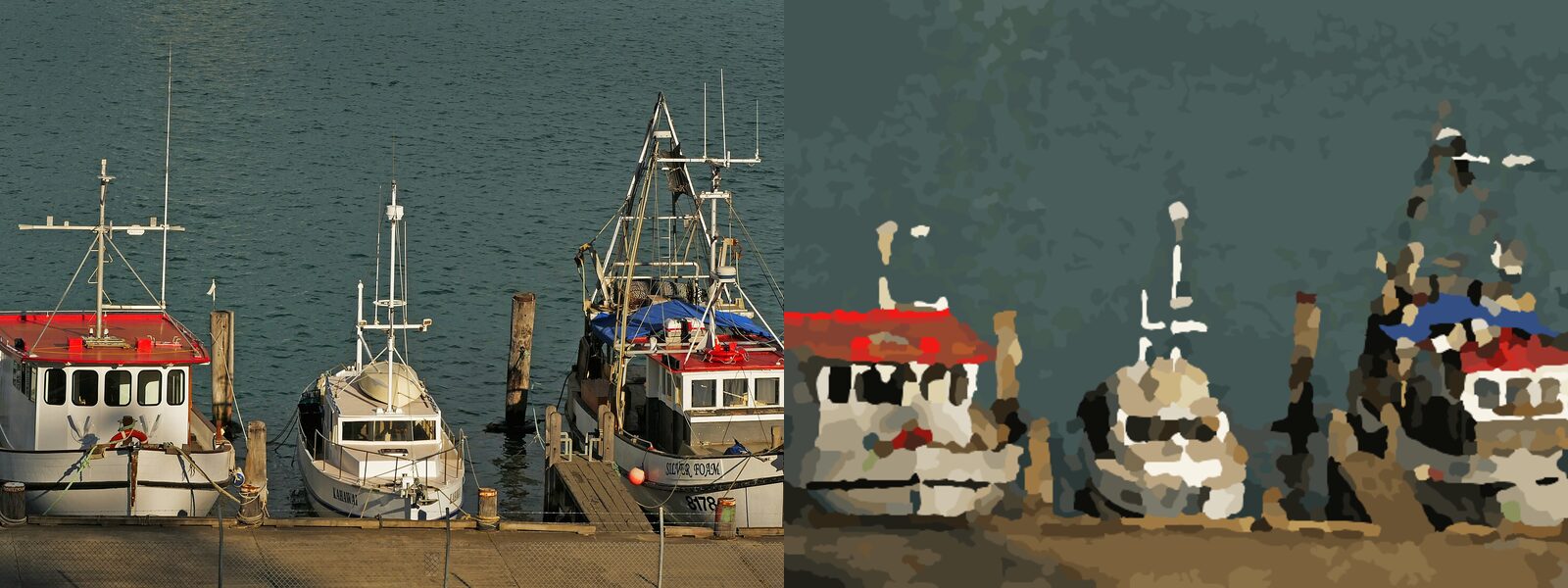
Going from 24 to 48 colours didn't change how many areas a paint by numbers pattern had. We ran 27 patterns from three photos, measured every area, and the count stayed put.
The extra colours changed something else, and it's probably what you care about when you pick a kit.
The setup was three photos (a dog, a cat, a harbour full of fishing boats), three canvas sizes and the three colour counts of Painting By Numbers, our own generator. Every result below describes that tool. Other generators may set their limits differently.
The canvas sets the number of areas, the palette barely touches it
Here is the number of areas per pattern. Each cell shows the lowest and highest result across the three photos. The cat and harbour ran landscape, so 40x30 further down is the same canvas as 30x40 here.
| Canvas (cm) | 24 colours | 36 colours | 48 colours |
|---|---|---|---|
| 30x40 | 591 to 596 | 589 to 597 | 591 to 594 |
| 40x50 | 978 to 987 | 988 to 994 | 989 to 991 |
| 60x80 | 2,340 to 2,358 | 2,350 to 2,368 | 2,349 to 2,387 |
A dog, a cat and a busy harbour landed within about 2% of each other. That isn't a law of paint by numbers. Our engine has a ceiling of about one area per 2 square centimetres of canvas, and all 27 patterns ran right up against it. A plainer photo can stay below that ceiling.
Painting time follows from that. Moving from 24 to 48 colours adds paint pots but no extra areas. Moving from 30x40 to 60x80 gives you four times as many areas to fill.
Does a bigger canvas give you bigger areas?
No, and this one surprised us. The median area barely moved when the canvas grew. For the dog at 36 colours it was 10.1 mm across on 30x40, 9.6 mm on 40x50 and 9.3 mm on 60x80.
So a bigger canvas isn't an easier version of the same painting. You get about the same size of area, and many more of them. The extra room goes into detail, while your brush work stays the same size. That changes how you should read any canvas size advice.
48 colours didn't land closer to the photo
We also compared each pattern with its photo, using Delta E, a standard measure of colour difference where lower means closer. We expected 48 colours to win easily. Across the nine photo and canvas combinations, 48 colours came out closer than 24 in four cases and further away in five.
The biggest gap we saw between any two colour counts was 0.45, for the harbour on 40x30: 7.45 at 24 colours, 7.90 at 36. That's the wrong direction, and it's small. Averaged over a whole picture, more colours didn't buy a better match.
A blue tarp only showed up at 48 colours
Averages hide the part you'd notice. In the harbour photo a blue tarp covers part of one boat. At 24 and 36 colours it's gone, absorbed into the greys around it. At 48 it's back.
The cat told the same story with the pink of its inner ear and nose, which appeared as the colour count went up.
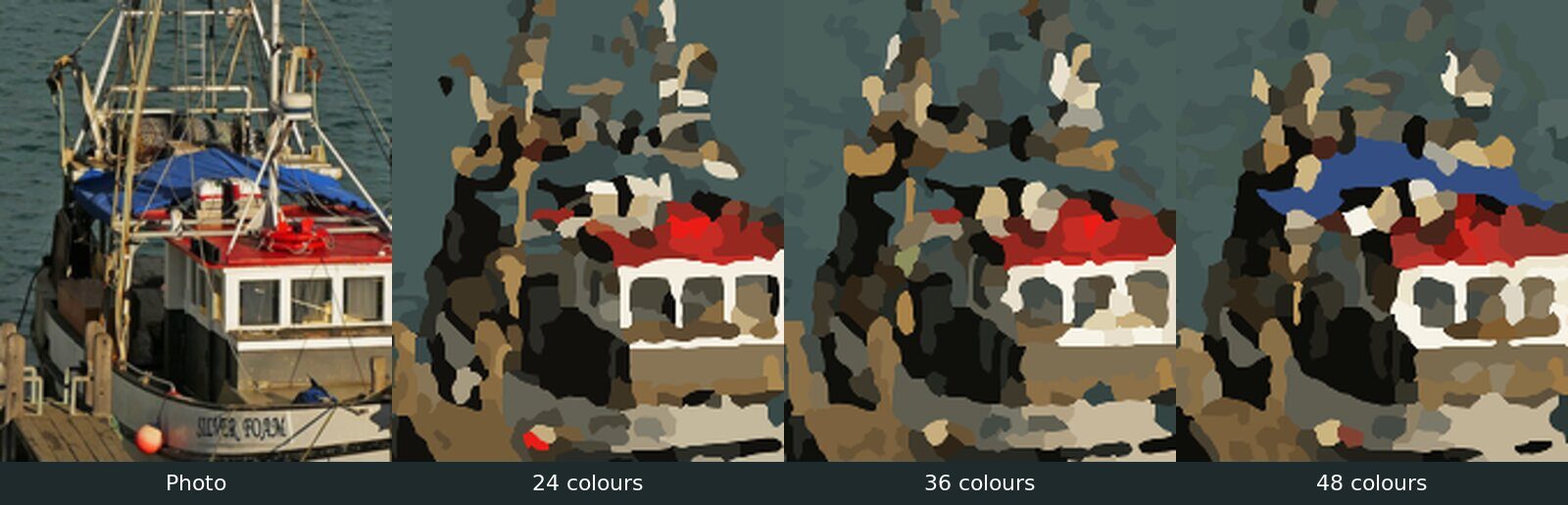
That's what extra colours were good for in this test. A small accent gets its own paint pot instead of being rounded off to the nearest neighbour.
Why did 24 colours leave more tiny areas?
This was the biggest difference in the whole test. We counted how many areas came in under 8 mm across, roughly the width of a pencil. Those are the ones you need a steady hand for.
| Photo | Canvas (cm) | 24 | 36 | 48 |
|---|---|---|---|---|
| Dog | 30x40 | 31.9% | 14.7% | 9.4% |
| Dog | 40x50 | 43.4% | 24.3% | 11.1% |
| Dog | 60x80 | 44.8% | 27.3% | 18.2% |
| Cat | 40x30 | 15.1% | 1.3% | 0.8% |
| Cat | 50x40 | 13.0% | 4.3% | 1.6% |
| Cat | 80x60 | 35.0% | 14.2% | 6.2% |
| Harbour | 40x30 | 62.1% | 45.2% | 31.2% |
| Harbour | 50x40 | 60.1% | 49.5% | 48.0% |
| Harbour | 80x60 | 64.9% | 50.3% | 33.4% |
Every row falls as colours go up. Fewest colours sounds like the simple option, but in this test 24 colours produced the most fiddly patterns. Our own guides used to say the opposite. We corrected them after this test, including how many colours your painting needs.
The harbour shows the likely reason. At 24 colours, on 40x30, the water merged into one shape covering more than half the canvas. At 36 colours the largest shape covered about a sixth.
Our reading is that the area budget stays the same, so when one shape swallows half the canvas, the rest of the picture gets crammed into what's left.
No palette fixed the masts
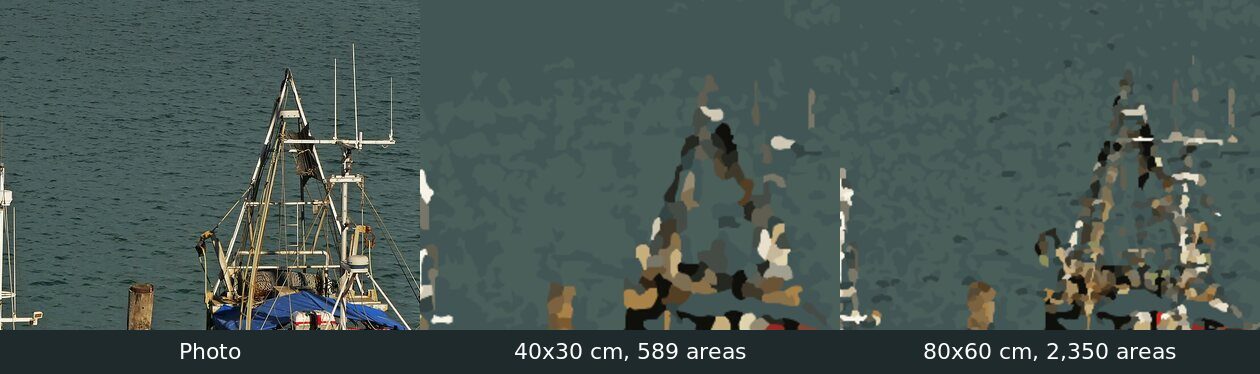
Thin lines are a different problem. The masts in the harbour photo came out broken at 40x30 at every colour count, because a line that thin can't hold together as areas of that size. At 80x60 they're still broken, but you can make out the frame and crossbars.
We built this generator, and nobody painted these patterns
Keep that in mind when you read the numbers above. We tested one generator, ours, on three photos. These were preview patterns at half the print resolution. Paid kits use the same engine and the same area ceiling, but that file is generated again and can differ.
Delta E is a blunt average measured on a screen, and it says nothing about how real paint looks on real canvas.
The harbour on 50x40 is also a weak data point, because the tool had to crop about 28% of the photo to fit that shape. So treat the percentages as a direction, not as a spec for your kit.
Which colour count should you pick for your photo?
Before you order, name the smallest thing in the photo you'd hate to lose. A red collar, a blue tarp, the colour of someone's eyes. Then preview your photo at 24 and at 48 colours on the same canvas size and look only at that spot.
If it appears at 48 and not at 24, go up in colours. If it's a thin shape that stays broken at 48, more colours won't help, so go up in canvas. Colours rescued the small accents in our test, and canvas rescued the thin lines.
The preview is free. If you'd rather paint on paper first, you can get printable paint by numbers from the same photo, and the photo guide helps if your picture falls apart at every setting.
Would the print file show the same thing?
The area ceiling is set in millimetres, so the count should hold at print resolution. The share of tiny areas is the open question, because sharper edges could split or merge shapes differently. Run the harbour through at full resolution and that table either stands or moves.
The harbour on 50x40 hints at a second limit too. Between 36 and 48 colours its tiny areas barely moved, from 49.5% to 48.0%. On a busy photo, extra colours may simply run out of effect.
Test run on 2 November 2026 with 27 patterns. Photos: Fishing boats quayside by Bernard Spragg. NZ (CC0); Domestic shorthair cat portrait in grass (CC0); Official Portrait of Buddy the Dog, White House Photograph Office (public domain).


